


1
/
of
2
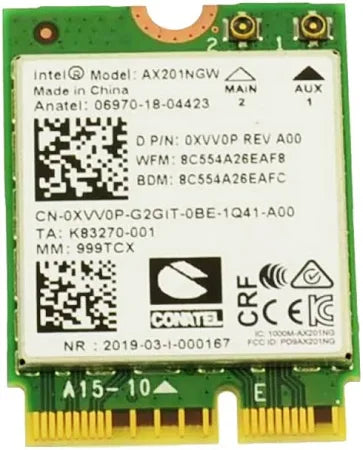
Dell Latitude 5420 14" Genuine Laptop Wireless XVV0P Wi-Fi Card
Dell Latitude 5420 14" Genuine Laptop Wireless XVV0P Wi-Fi Card
Regular price
Rs. 2,200.00
Regular price
Sale price
Rs. 2,200.00
Shipping calculated at checkout.
Quantity
Couldn't load pickup availability
Share

Product Details
💻 Product Details
Experience reliable and high-speed wireless connectivity with the Dell Latitude 5420 XVV0P Wi-Fi Card, a 100% genuine Dell OEM component. Designed to deliver exceptional wireless stability, this module ensures uninterrupted data transfer, faster internet speeds, and seamless Bluetooth pairing. Perfect for replacing a faulty network card or upgrading your laptop’s performance, this Wi-Fi card restores your Latitude 5420 to its full potential.
At Sparto.shop, we provide only authentic Dell components backed by warranty and PAN-India delivery support.
⚙️ Technical Specifications
| Specification | Details |
|---|---|
| Brand | Dell |
| Model | XVV0P |
| Part Type | Wi-Fi + Bluetooth Card |
| Compatibility | Dell Latitude 5420 |
| Interface Type | M.2 2230 NGFF |
| Wireless Standard | IEEE 802.11a/b/g/n/ac/ax (Wi-Fi 6 Ready) |
| Frequency Band | Dual Band 2.4GHz & 5GHz |
| Bluetooth Version | 5.2 |
| Transfer Speed | Up to 2.4 Gbps |
| Antenna | Dual Internal Antenna Connector (IPEX) |
| Operating System Support | Windows 10 / 11 (64-bit), Linux |
| Condition | Brand New, Genuine OEM |
| Warranty | 6 Months Replacement Warranty |
| Package Includes | 1 x Dell XVV0P Wi-Fi Card (No antenna cables) |
💡 Key Features & Benefits
- ✅ Seamless Connectivity: Supports Wi-Fi 6 for faster, more reliable wireless performance with minimal latency.
- ✅ Dual-Band Flexibility: Automatically switches between 2.4GHz and 5GHz bands for optimal connection speed.
- ✅ Energy Efficient: Low power consumption helps extend your laptop’s battery life.
- ✅ Integrated Bluetooth 5.2: Connect multiple devices—mice, keyboards, headsets—with stable pairing and reduced interference.
- ✅ OEM Precision Fit: Direct replacement part for Dell Latitude 5420 — no modification needed.
- ✅ Easy Installation: Fits into the M.2 slot with standard screw-mount fitting (tools not included).
🧩 Compatible With
- Dell Latitude 5420
- Also compatible with Dell Latitude 5410 / 5421 / 5520 series (check compatibility before ordering)
🛠️ Installation Instructions
- Power off and unplug your laptop.
- Remove the bottom base cover using a Phillips screwdriver.
- Locate the Wi-Fi card slot on the motherboard.
- Gently remove the old module (if present).
- Insert the new XVV0P card into the M.2 slot.
- Secure with a screw and reconnect the antenna cables.
- Reassemble and power on your system.
- Install the latest Intel Wi-Fi and Bluetooth drivers from Dell’s official website.
🚚 Shipping & Warranty
- Shipping: Express PAN-India Delivery (2–5 business days).
- Warranty: 6-month replacement warranty for manufacturing defects.
- Returns: Hassle-free return policy within 7 days of delivery (unused condition).
🔧 Why Buy from Sparto?
- 🧾 Transparent GST Invoicing for every purchase.
- 🛡️ 100% Genuine Dell OEM spare parts, no third-party replicas.
- 📦 Secure anti-static packaging to prevent electrostatic or physical damage.
- 🚀 Express nationwide delivery and dedicated after-sales support.